![[dinosaur peeking in from the right] Hey! I now have a newsletter! Come take a look.](https://yal.cc/wp-content/themes/dotpage/images/mailing-list.png)
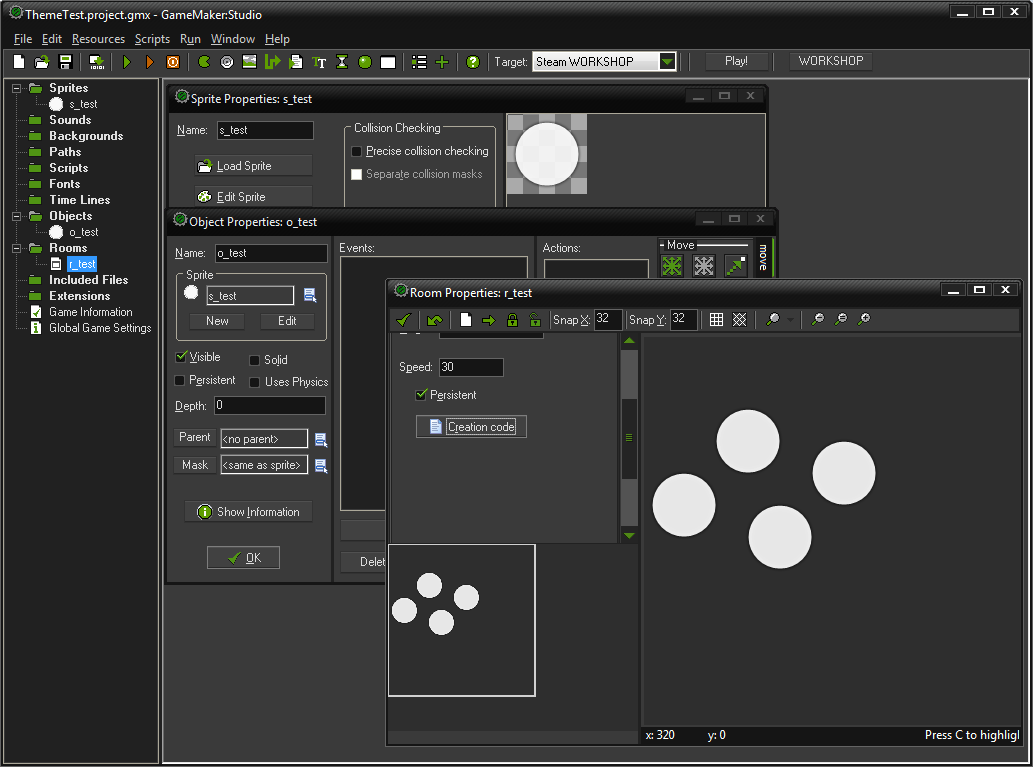
Today, instead of doing something possibly more interesting for a hour and some, I've spent those to edit standard theme that comes with GameMaker: Studio.
Modifications are as following:
- Active window now has grey border, rather than a indefinitely green one.
- Window captions now have a slight tilted line texture. Makes these a tiny bit less boring to look at.
- Window control buttons are now better-spaced and cleaner.
- Window border is now 3px instead of 4px, also with smaller amount of "rounding" on top of windows.
- Fixed issue with 2-3 magenta pixels appearing near top-right corner when resizing MDI windows a lot.
- Menu text is now of light-grey colour.
- All sorts of buttons now have a grey colour for currently active one, and easier to distinguish green border for mouse-over.
- Checkboxes now have an actual (non-triangular) "check"
- Radio buttons are now properly anti-aliased.
I'll try to also include an icon file soon, but until then, a preferred method of installation is baking up of original "GMGreen.skn" and placing .skn from archive on it's place. Restarting GameMaker: Studio is required, obviously.