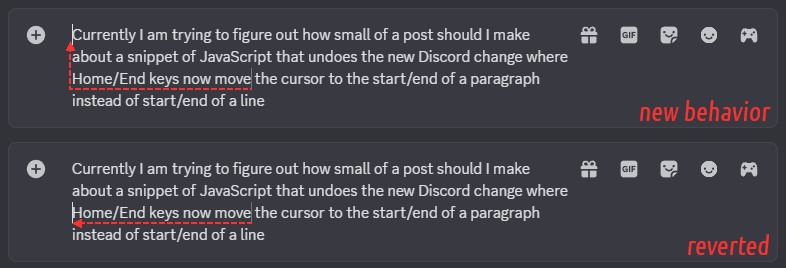
With sufficiently poor luck you might have already noticed The New Thing in the latest Discord update: Home/End keys now navigate to the start/end of the current paragraph instead of a line.
This is a tiny post about fixing that.
First, the code. You could paste it straight into a JavaScript console if you know what you're doing, or install it as a userscript.
let attrMark = "yal-undo-home-end";
let query = `div[role="textbox"]:not([${attrMark}])`;
setInterval(() => {
	for (let tb of document.querySelectorAll(query)) {
		tb.setAttribute(attrMark, "");
		tb.addEventListener("keydown", (e) => {
			if (e.key == "Home" || e.key == "End") {
				e.stopImmediatePropagation();
			}
		});
	}
}, 300);
Not a whole lot of code here!
It periodically finds textboxes that have not yet been tagged, tags them, and gives them a keyboard event listener that prevents the events for Home/End keys from making it to Discord's event handlers.
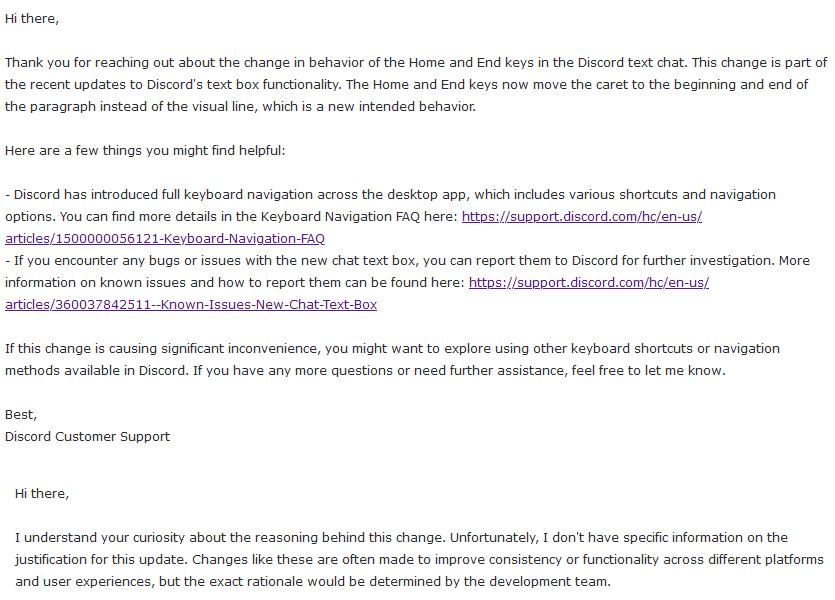
As for why would Discord do this to you, according to a somewhat LLM-looking support ticket reply (#57507099), it's intended and unfortunately there is no specific information on justification.
So there's that. Maybe they'll reconsider if you scream at them really loudly.
Just got hit with this “functionality” and I hate it!
Is there a way to install this script on the desktop client of Discord?
Not officially, no – there are some third-party client forks that support plugins but using these is always a risk
Being used to terminals doing this, I noticed it was part of an update only when I saw it also navigate… Markdown stars!
…Then I realized this one existed and it too, caused me immense pain.
I haven’t even been active on Discord for the past three years.
The public needs to know this. …LOL.
Regardless, thank you! I for some reason really thought this one would’ve gotten largely uncovered online…!
With the amount of people who dislike discord changes, you’d think they’d add a special part of the accessibility tab for restoring certain legacy functions, like they did with the gaming overlay. (The overlay mapping kinda sucks when using GameMaker since Shift + Tab is used there, but its easily fixable in settings.)
Another way to work around this is…
Accessibility -> Use the legacy chat input
…though you lose all the inline formatting previews like -# shrinking text, emoji, etc. But if you’re on the desktop client instead of the browser it’s another workaround for now.
Oh, that’s good to know! I tried Chat ➜ Text box, which did disable inline element display but did not disable this behavior change.